
A single command solves one problem. A plugin solves the set: commands, subagents, skills, hooks, MCP servers and language servers packaged together, with a version, with a declared source, and with the ability to be turned on and off per project.
The /plugin command in Verboo Code is what turns that package into something installable. It validates the manifest before anything enters use, registers catalogs (marketplaces) that plugins come from, installs by identifier, and tracks the on/off state in each settings scope.
This article shows the structure the loader expects, the validation command that catches schema errors early, the minimal marketplace.json for publishing a local catalog, and the path for anyone who just wants to install something ready.
What does a plugin have that a loose command does not?
It is a versioned unit with several components and an enabled state. A command file in .verboo/commands/ is just a named prompt. A plugin can ship commands, agents, skills, hooks, MCP servers and LSP configuration in the same package, and still be enabled or disabled as a whole.
In practice that changes three things: the command gets a namespace, the on/off state is written to settings per scope, and updating is a single operation instead of copying files one by one.
| Component | Where it lives in the plugin | What it becomes in session |
|---|---|---|
| Commands | commands/*.md | /plugin-name:command |
| Agents | agents/*.md | subagent available for delegation |
| Skills | skills/<name>/SKILL.md | command namespaced by directory |
| Hooks | hooks/hooks.json | command fired on a tool event |
| MCP servers | .mcp.json | registered MCP tools |
| LSP servers | manifest lspServers field | definition, type and diagnostic queries |
What is the minimal structure of a plugin?
The loader accepts a directory with any combination of these folders. The manifest is optional: without it, the plugin still loads and gets a default manifest. With it, you get a stable name, a version and validation.
my-plugin/
├── plugin.json          # or .claude-plugin/plugin.json
├── commands/
│   └── deploy.md        # becomes /my-plugin:deploy
├── agents/
│   └── test-runner.md
├── hooks/
│   └── hooks.json
└── .mcp.json
The manifest is a JSON with a required name, no spaces (kebab-case), and the rest optional. Metadata fields are version, description, author, homepage, repository, license, keywords and dependencies. Unknown top-level fields are silently dropped, so a typo there will not break loading, but it will not do anything either.
{
  "name": "my-plugin",
  "version": "1.0.0",
  "description": "Team deploy commands",
  "commands": {
    "deploy": {
      "source": "./commands/deploy.md",
      "description": "Publishes the service to the chosen environment",
      "argumentHint": "[staging|prod]"
    }
  }
}
The commands field accepts three formats: a single path, a list of paths, or an object mapping name to metadata. In the object, each entry needs source (a file) or content (inline markdown), never both. Each command can also declare its own model and allowedTools.
How do you validate the manifest before installing?
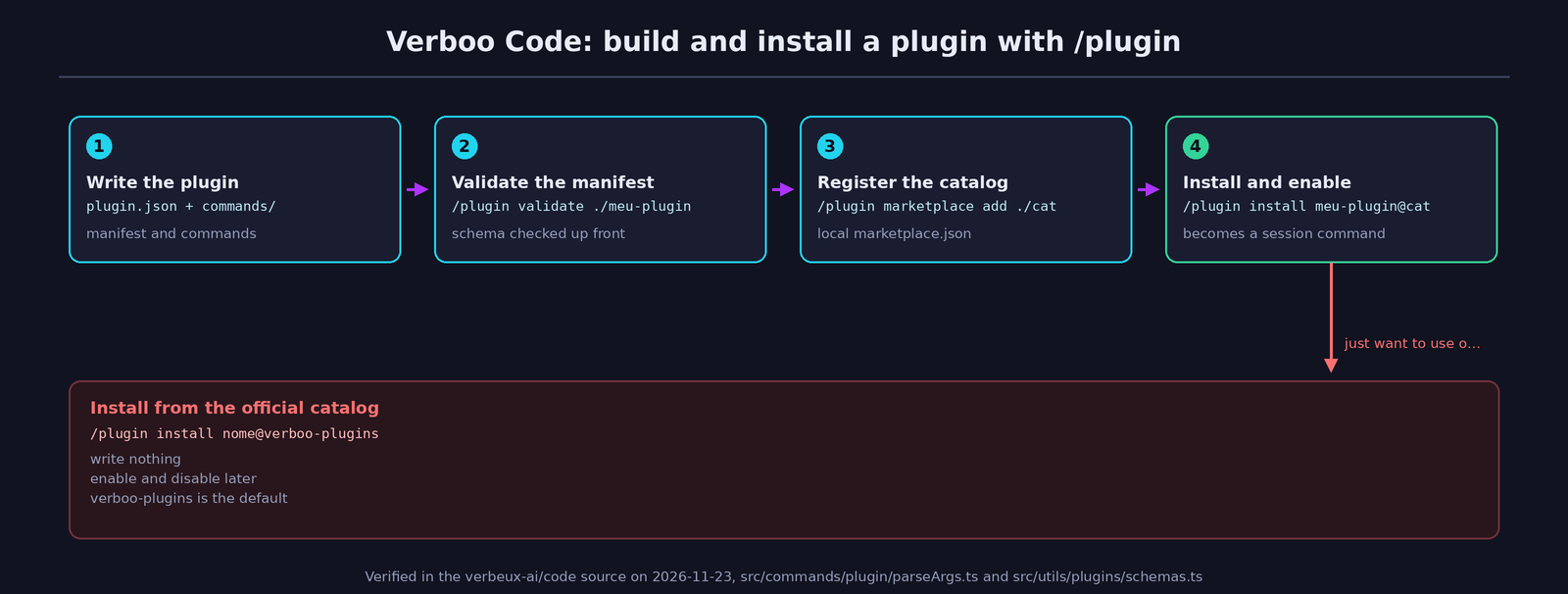
By running /plugin validate pointed at the directory. Validation applies the manifest schema and returns the exact error, instead of letting the plugin fail silently at load time.
/plugin validate ./my-pluginWorth running after every edit to plugin.json. Typical errors that only show up here: a name with a space, source and content on the same command, or a relative path that escapes the plugin root.
How do you register a catalog and install the plugin?
A catalog is a marketplace.json file that lists plugins and where to fetch them. /plugin accepts adding a catalog by GitHub repository (owner/repo), by git URL, or by local path.
The minimal marketplace.json has a name and a plugins array. Each entry needs name and source. The source can be a relative path inside the catalog, an npm package, a pip package, a git repository, a GitHub repository, or a subdirectory of a monorepo.
{
  "name": "team-catalog",
  "plugins": [
    {
      "name": "my-plugin",
      "source": "./plugins/my-plugin",
      "category": "development",
      "tags": ["deploy"]
    }
  ]
}
With the catalog registered, installation uses the plugin@marketplace format:
/plugin marketplace add ./catalog
/plugin install my-plugin@catalog
/plugin marketplace also accepts remove, update and list. list prints the configured catalogs, handy when installation fails because of a wrong catalog name.
How do you enable, disable and remove?
With enable, disable and uninstall, all accepting the plugin@marketplace identifier.
/plugin disable my-plugin@catalog
/plugin enable my-plugin@catalog
/plugin uninstall my-plugin@catalog
The on/off state is written to settings as a map of plugin@marketplace to boolean, and the precedence order is policy, local, project and user. That lets a plugin be on for the project and off for the user, without conflict. A plugin blocked by organization policy cannot be re-enabled by the user.
With no argument, /plugin opens the panel with four tabs: discover, installed, catalogs and errors. The errors tab is where plugins that failed to load show up.
Can you install without writing anything?
Yes. Verboo Code ships with the official verboo-plugins catalog configured, and there is a secondary catalog of plugins from the Anthropic ecosystem. Plugins bundled into the binary appear with the @builtin suffix and can be enabled and disabled the same way.
/plugin install name@verboo-pluginsThat is the path for anyone who just wants to use one. You install by identifier, and /plugin handles downloading, caching and registering. If an enabled plugin fails to load, the CLI warns on startup and points you to check /plugin or run the installation diagnostic.
What is the right order so you do not waste time?
Write, validate, register, install. Validating before registering avoids discovering the schema error after the catalog already points at a broken plugin, and registering before installing is what gives a name to the marketplace that appears after the @.
If the team already has commands scattered across .verboo/commands/, packaging them into a plugin solves distribution in one move: a single install carries commands, agents and hooks together, versioned. In Verboo Code the /plugin command ships with the official catalog enabled, so you can test the install before publishing your own.