
You open Codex on the desktop, find Finances in the plugin list and click install. What comes back is this:
Failed to load plugin
read remote plugin details: remote plugin catalog request to
https://chatgpt.com/backend-api/ps/plugins/plugin_connector_... failed with status 404 Not Found:
{"detail":"Plugin not found"}
The first reading is that your account has a problem, that a permission is missing or that the install got stuck halfway. None of the three. The request leaves correctly, authenticated and with the right plugin identifier, and the [OI] catalog itself answers that the plugin does not exist. Reinstalling, updating the app and signing out and back in change nothing, because the problem is not on your side. This guide shows why the error appears, what the Codex code does with it and the path that works today to use Finances.
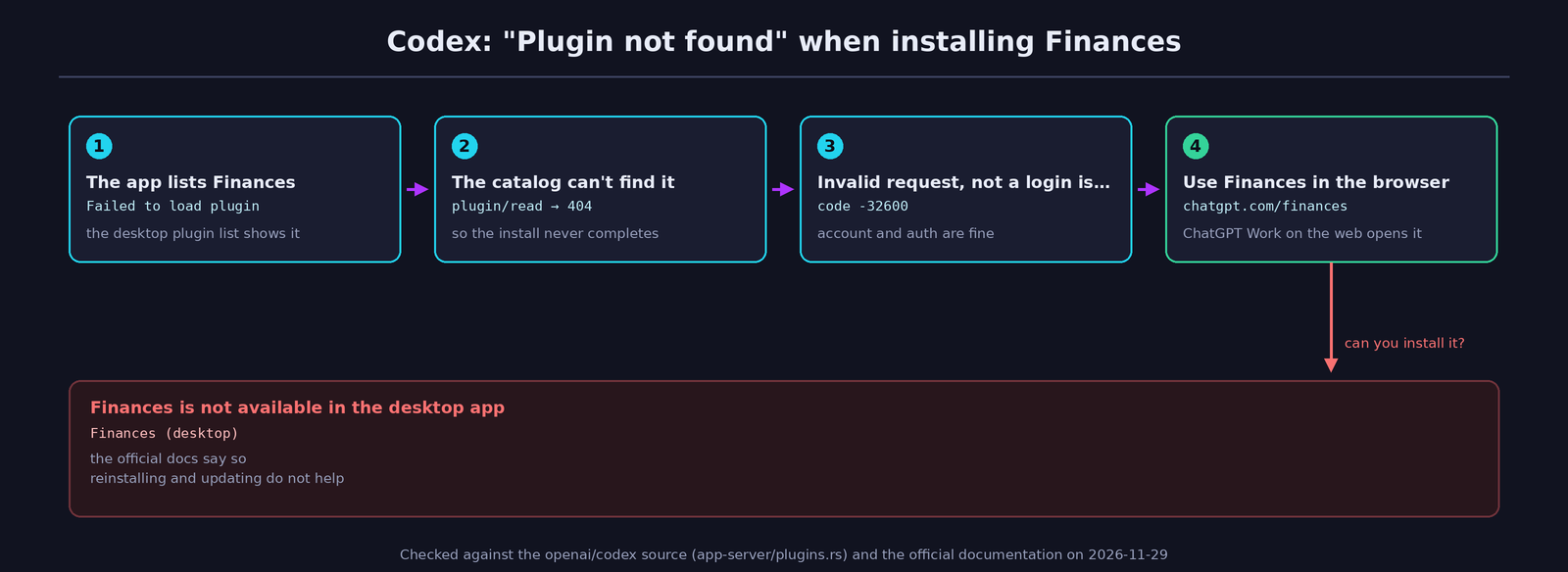
Why does "Plugin not found" appear if Finances is in the list?
Because the desktop list and the catalog that serves plugin details are two different things. The list shows a card that points to a plugin identifier. When you click install, Codex makes a second call, now to the catalog service, asking for the details of that identifier. It is that second call that returns 404 with the body {"detail":"Plugin not found"}.
In other words: the card existing in the UI does not mean the plugin is published and installable on the desktop at that moment. The 404 comes from the server, not from your machine.
What does the Codex code do with that 404?
It treats it as an invalid request, not as an authentication failure. In the official openai/codex repository, the file codex-rs/app-server/src/request_processors/plugins.rs builds the message you see and decides the error code. The remote_plugin_catalog_error_to_jsonrpc function splits the catalog cases: when the status is 404, the error becomes invalid_request. The expired-token and unsupported-auth-mode cases also land in invalid_request, but for another reason. What matters is what stays out: nothing on that path suggests signing in again.
The message itself comes from codex-rs/core-plugins/src/remote.rs. The UnexpectedStatus error formats exactly remote plugin catalog request to {url} failed with status {status}: {body}, which is why you see the catalog URL and the JSON body on screen. The read remote plugin details prefix is added by the caller before installing, in codex-rs/core-plugins/src/remote_mutations.rs. That split explains the text: Codex was reading the remote details before installing, and the read failed.
Does reinstalling, updating or signing in again fix it?
No, and the reason is direct: none of those actions changes what the server answers for that plugin identifier. Authentication is working (otherwise the error would be about a token, not a 404), the local install never started (Codex never even downloaded the bundle) and the app version does not alter the remote catalog. If the plugin is not published for the desktop, any client on the same account gets the same 404.
| Symptom | What it means | What fixes it |
|---|---|---|
Failed to load plugin + 404 + Plugin not found | The remote catalog does not have that plugin for your client | Use Finances where it exists: on the web |
chatgpt authentication required | Authentication is missing, not the catalog | Sign in to Codex again |
api key auth is not supported | You are on API key auth instead of ChatGPT login | Switch to ChatGPT authentication |
| Network error, timeout, TLS | The request never reached the catalog | Network, proxy or certificate |
So where does Finances work?
On the web, inside ChatGPT Work. The official [OI] documentation on tracking accounts and subscriptions says, in so many words, that Finances opens from the sidebar in ChatGPT Work on the web and that it is not available in the desktop app. That closes the case: the card on the desktop is what is left of a surface where the feature was not rolled out, and the 404 is the server confirming it.
The path that works today:
- Open ChatGPT Work in the browser, with the same account you use in Codex.
- In the sidebar, select Finances.
- Connect the accounts and data sources there. The configuration lives in your account, not in the app.
If your goal was to automate reading that data through a coding agent, Finances is not the path on the desktop today. The path is exporting the data from the web and handling the file in your code flow, with the agent reading the local file.
How do I know this is this error and not another?
By the message body. This error always brings three things together: the phrase read remote plugin details, a catalog URL starting with chatgpt.com/backend-api/ps/plugins/ and the body {"detail":"Plugin not found"} with status 404. If any of them is missing, it is another problem. An authentication error talks about authentication required. A network error talks about connection or timeout. Only this one pairs a 404 with Plugin not found.
It is worth keeping the URL and the plugin identifier (plugin_connector_...) when opening an issue in the openai/codex repository. That is what lets [OI] confirm whether that plugin was supposed to be published for the desktop.
What to do in the meantime?
Do not waste time reinstalling. Log the case with the URL and the identifier, use Finances on the web and keep working. When the feature is rolled out to the desktop, the same card that returns a 404 today starts opening normally, with no change on your side.
And if what you want is a coding agent that reads your data and runs the work in the terminal, without depending on which surface rolled out which plugin, Verboo Code does that in the terminal with your local files. Run your flow in Verboo Code and measure the time you stop losing to an error that is not yours.