In three months we wrote 36 command tutorials for the Verboo Code blog. In 35 of them the subject was a different command, and the mistake that kept coming back was not weak writing or a bad example. It was documenting a command the reader cannot run. It exists in the repository, it has a description, it has a full implementation, it has everything. It just never makes it into the build the user downloads.
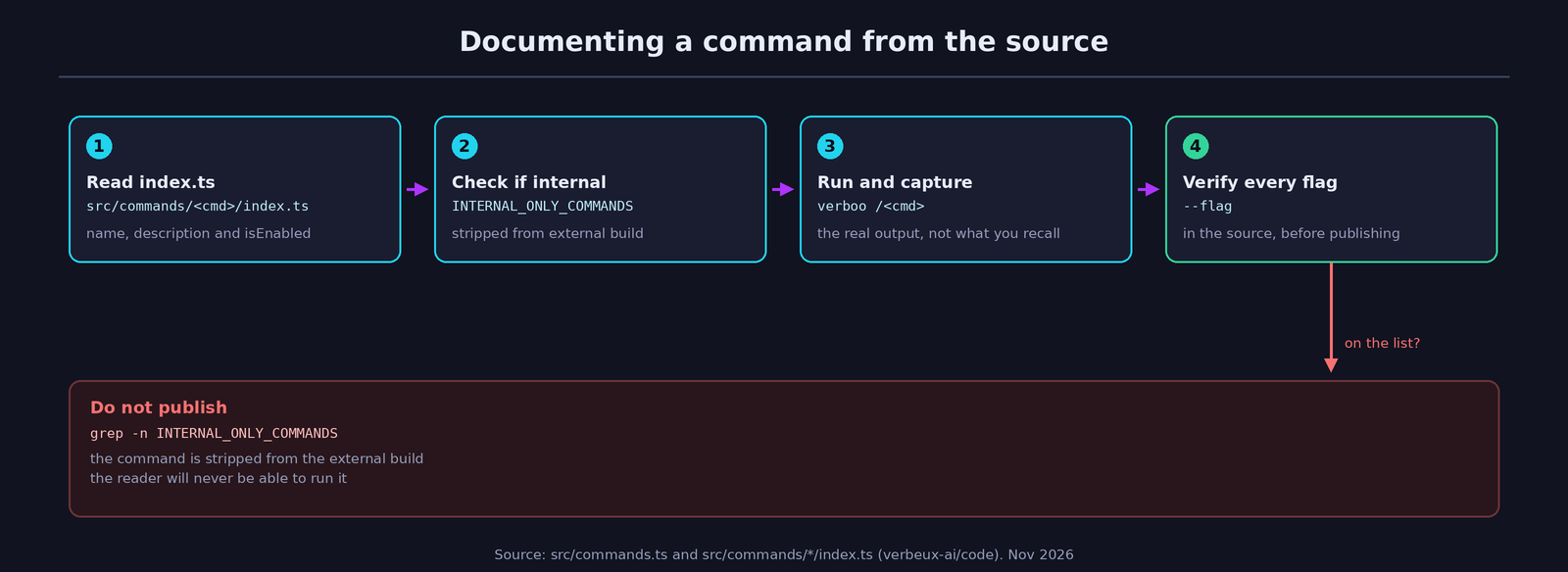
Short answer: before writing about a command, check four things in the source: whether it is in the public command list, whether it sits in INTERNAL_ONLY_COMMANDS, whether its isEnabled depends on a flag or environment variable, and whether its availability depends on a provider. If any of those gates is closed, the whole tutorial is wasted, because the reader will type the command and nothing will happen.
Why read the code instead of trusting memory?
Because the build that reaches the reader is not the build in the repository. Four different mechanisms decide whether a command shows up for someone, and none of them lives in the file name. Team memory gets three right and misses the fourth, and the fourth is always what turns into a wrong article.
The case that hurts most: /commit and /commit-push-pr have complete implementations under src/commands/. They look perfectly public. Both are in INTERNAL_ONLY_COMMANDS, so the code is stripped from the external build. Anyone documenting /commit by reading the directory would publish a command that does not exist.
The opposite also happens. An internal note of ours said /tasks was internal-only. That was wrong: /tasks is in the public list, at line 373 of src/commands.ts. The code corrected the memory, not the other way around.
What are the four gates that hide a command?
They all live in src/commands.ts and in each command's index.ts. Listed in the order the CLI evaluates them:
| Gate | Where it lives | What it means |
|---|---|---|
Not in COMMANDS() |
src/commands.ts |
The command does not exist. There is nothing to document. |
INTERNAL_ONLY_COMMANDS |
src/commands.ts |
Only included when USER_TYPE=ant and not a demo. Stripped from the external build. |
availability |
src/commands.ts |
Depends on subscription type or provider. Third-party API key users never see it. |
isEnabled() |
src/commands/<name>/index.ts |
Feature flag or environment variable. May be on today and off tomorrow. |
The detail that matters: the filters run inside getCommands(), which is what feeds /help. In other words, the /help list is already the filtered list. If the command shows up there in your install, it exists for your account type. If it does not, one of the four gates closed, and you need to know which one before writing a single line.
How do you check the public and internal lists without cloning the repo?
With gh, straight against the GitHub API. Two commands answer the two questions that matter most.
# how many command directories actually exist
gh api repos/verbeux-ai/code/contents/src/commands --jq '.[].name' | wc -l

# what sits in the internal-build-only list
gh api repos/verbeux-ai/code/contents/src/commands.ts --jq '.content' \
  | base64 -d | sed -n '/INTERNAL_ONLY_COMMANDS = \[/,/filter(Boolean)/p'
As of this publication the repository has 103 directories under src/commands, 99 entries in COMMANDS() and 28 in INTERNAL_ONLY_COMMANDS. Three of those 28 are conditional, added by spread when a build flag is on. The sed above prints the whole block, spreads included, so you see the real list and not the version someone remembered to write down.
If the name you want to document shows up in that block, stop. It is not about hiding anything: the comment in the file itself says the commands on that list are eliminated from the external build. Publishing a tutorial for an eliminated command is the definition of content that serves nobody.
Where do the subcommands that /help never shows live?
In two places, and neither is /help. The first is the argumentHint field in index.ts, which declares the accepted syntax. The second is the switch in the implementation, which is where the cases are actually handled.
A real example, /lsp. The index.ts declares five subcommands on one line:
argumentHint:
  'status | recommend [path] | install <plugin-id> | uninstall <plugin-id> | restart'
And lsp.ts confirms all five in the switch, on lines 250 through 258. Without reading both, it is easy to write a tutorial that only covers status and leaves the reader unaware that the same command can install a language plugin. The argumentHint gives you the list; the switch tells you what each case really does.
gh api repos/verbeux-ai/code/contents/src/commands/lsp/index.ts --jq '.content' | base64 -d
gh api repos/verbeux-ai/code/contents/src/commands/lsp/lsp.ts --jq '.content' \
  | base64 -d | grep -n "case '"
How do you know whether the command is enabled for that user?
By reading isEnabled. It is a function, not a constant, and that is the trap: a command can sit in the public list, have isEnabled return false by default, and never appear for anyone.
Two examples from the repository itself. /doctor has isEnabled: () => !isEnvTruthy(process.env.DISABLE_DOCTOR_COMMAND), so it disappears when that variable is set. /keybindings depends on a feature flag that ships off by default, which keeps the command out of /help until the flag turns on. Documenting either one without mentioning the condition hands the reader a command that errors out as unknown.
What is the checklist before publishing the tutorial?
Five questions, in order. If any answer is "no", the article changes or does not ship.
- Is the command in
COMMANDS()and outsideINTERNAL_ONLY_COMMANDS? - Does
isEnableddepend on a flag or environment variable, and does the article say so? - Did the subcommands come from
argumentHintand theswitch, not from memory? - Is the output in the article from a real run, not a plausible example?
- Does the command's own text promise another command that does not exist?
That last one nobody expects. The name promises one thing and the description delivers another: /commit-message is called "commit message", but the description registered in the code is "Configure commit attribution text", and the argumentHint lists status, off, default, set "text" and co-author. Whoever writes from the name gets the whole tutorial wrong. Whoever reads index.ts gets it right on the first line.
What changes in the result?
Less rework and more confidence in what is published. Before the checklist, the pattern was finding the problem afterwards: someone tried the command, it did not work, and the article went back into the queue. Now the check happens in minutes, at the start, while switching topics is still cheap.
The secondary gain is that the code became the blog's source of truth. Every time team memory and the repository disagreed, the repository won. That holds for commands, flags and behavior. The rule that stuck: if it is not in the code, it is not in the article.
It is the same flow Verboo Code runs when you ask it to document a command: it reads index.ts, checks the gate lists, runs the command and only then writes. The step by step we describe here is exactly what it does on its own, with one less command to type.