
Three weeks of sessions and the Verboo Code memory folder turns into a dumping ground: five files about the same bug, a relative date of "last week" that no longer means anything, and an index with forty lines pointing at files that were rewritten. The agent reads all of it at the start of every session, and context spent on disorganized memory is context that is not left for the code.
Short answer: /dream is a consolidation pass over that folder. It re-reads the index and the topic files, merges what is duplicated, fixes what went stale, deletes what was contradicted, and tightens the index. It runs with one command, no arguments, and records the run time so the next pass knows where to start.
What does /dream do?
The command is not a script that rewrites files on its own. It assembles a four-phase script and hands it to the agent, which reads and rewrites memory using the normal tools. Each phase has a specific job, and that order is what prevents the most common outcome of reorganizing memory by hand: new duplicates stacked on old ones.
| Phase | What happens |
|---|---|
| 1. Orient | lists the memory folder, reads MEMORY.md, and skims the topic files so it improves what exists instead of creating near-duplicates |
| 2. Gather signal | looks for new information in daily logs, in facts that aged, and, when it needs something specific, with a narrow grep across transcripts |
| 3. Consolidate | writes or updates one file per topic, converts relative dates into absolute dates, and deletes facts that today's investigation disproved |
| 4. Prune and index | rewrites MEMORY.md as an index: one line per memory, no content, and removes pointers to what became obsolete |
At the end it returns a short summary of what it consolidated, updated, or pruned. If memory was already tight, the answer says exactly that, and no file changes.
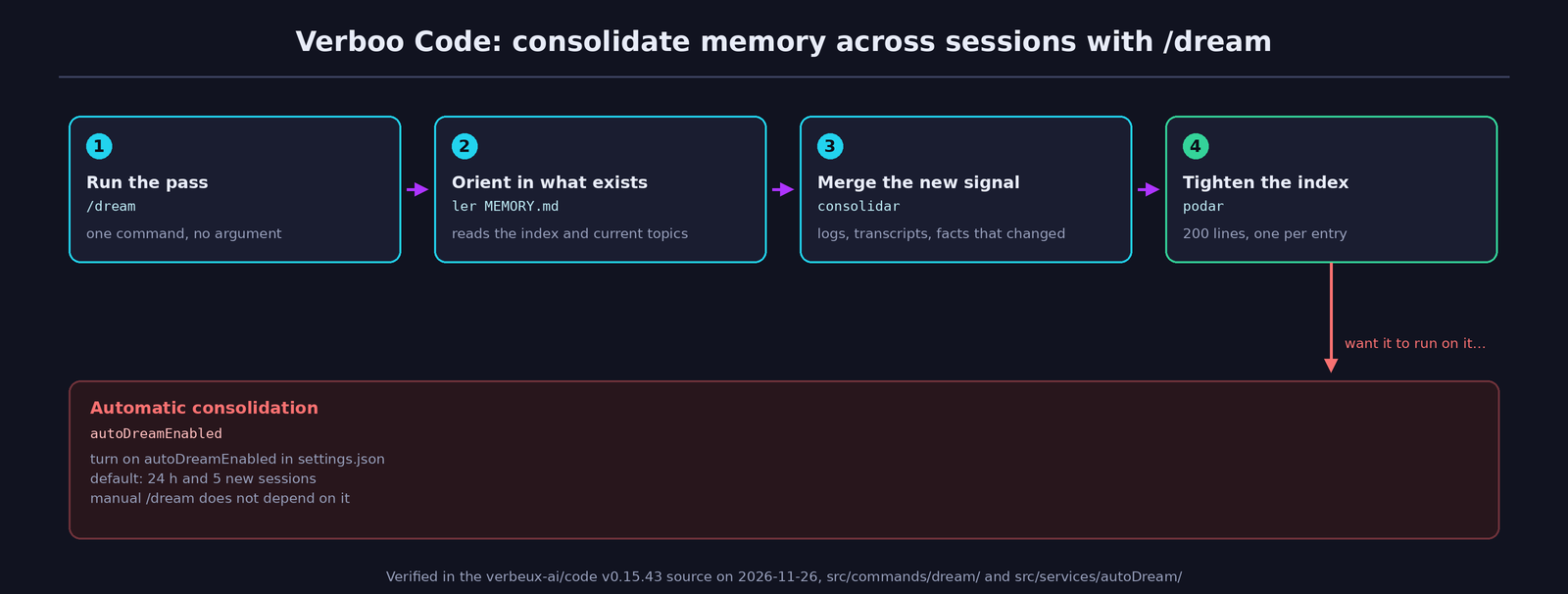
/dream and the automatic consolidation branch. Verified in the v0.15.43 source on 2026-11-26.How do you run /dream?
One command, no arguments, no confirmation afterwards. While the pass runs, the footer shows consolidating memories.
/dreamThe command shows up whenever automatic memory is on, and it is on by default. If you turned automatic memory off in the configuration, /dream does not appear in the command list.
What does it read, and where does it write?
Automatic memory lives outside your project, in a folder separated by working directory. The folder name is the project path with everything that is not a letter or a number replaced by a hyphen, the same scheme Verboo Code uses for sessions.
| Path | Role |
|---|---|
~/.verboo/projects/<project-slug>/memory/MEMORY.md | index, loaded at the start of every session |
~/.verboo/projects/<project-slug>/memory/*.md | topic files, one subject per file |
~/.verboo/projects/<project-slug>/memory/logs/YYYY/MM/YYYY-MM-DD.md | daily log, when assistant mode is in use |
~/.verboo/projects/<project-slug>/memory/.consolidate-lock | lock file; its modification time is the hour of the last consolidation |
~/.claude/projects/<project-slug>/*.jsonl | session transcripts, consulted only when the agent needs to confirm a detail |
Two practical consequences. First: because the directory is resolved from the Git repository root, worktrees of the same project share a single memory, so consolidating in one worktree applies to the others. Second: transcripts live in the ~/.claude tree on purpose, to interoperate with session history, which is why the memory path and the transcript path do not match.
How is the MEMORY.md index maintained?
It is an index, not a dump, and the limit is hard: 200 lines and about 25 KB. Each entry is a single line with a title, a link to the topic file, and a short summary under 150 characters.
- [Deploy queue](deploy-queue.md) - locked by Redis, not by a queue
- [pnpm rule](pnpm.md) - the team never uses npm in this repo
When the file goes over the limit, Verboo Code loads only the part that fits and warns in its own context that the index is too large. It does not break the session, but you lose pointers without noticing. That is exactly the bloat that phase 4 of /dream fixes: an index line over 200 characters is carrying content that belongs in the topic file.
How do you enable automatic consolidation?
With the autoDreamEnabled key in the user configuration file.
{
  "autoDreamEnabled": true
}
With it on, consolidation runs in the background when two conditions are met at the same time: at least 24 hours since the last pass and at least 5 new sessions since then. Those are the defaults. A file lock prevents two passes at once, and a pass that dies halfway releases the lock for the next attempt.
| Condition | Default |
|---|---|
| Minimum hours since the last consolidation | 24 |
| Minimum new sessions | 5 |
| Automatic memory on | required |
| Remote mode or assistant mode | disables the automatic pass |
Worth knowing: manual /dream also records the run time. If you run it by hand in the morning, the automatic pass will not fire again in the afternoon over the same batch of sessions.
/dream, /memory, or /knowledge?
They are three different memories, and using the wrong command is the most common friction. The table below tells you which one you are touching.
| Command | What it stores | Who writes it |
|---|---|---|
/memory | project rule and instruction, in a Markdown file such as AGENTS.md | you, by hand |
/dream | the automatic memory folder: index plus topic files | the agent, consolidating sessions |
/knowledge | entity graph extracted from the conversation, per project | the extraction engine, automatic |
The difference that matters: /memory is what you want the agent to obey, /dream is what the agent learned on its own and needs tidying, /knowledge is what it extracted from the conversation and you want to inspect or delete.
When does /dream not help?
In three cases, and it is better to know before running it. If the memory folder is empty, there is nothing to consolidate and the pass ends without changing a file. If what you want is a fixed rule the agent always obeys, the path is /memory, because consolidated memory is a summary of what happened, not an order. And if the project holds secrets that must not become memory, the fix is turning automatic memory off for that directory, not cleaning up afterwards.
Open Verboo Code in the project you have worked on the longest and type /dream. If the summary that comes back mentions duplicates removed or facts corrected, your memory was slowing sessions down and is now lighter.