
/insights is the command that reads the logs of your finished sessions and returns an HTML report showing what you worked on, what went well, and where the work got stuck. It does not analyze your code. It analyzes your conversation history with the agent.
That changes the question the report answers. It is not "is my code good", it is "am I using the agent the right way".
What does /insights do, in one sentence?
It scans the sessions saved on disk, extracts a structured facet from each one, and cross-references everything into a report with sections on work areas, usage style, friction and suggestions. The final output is a single file that opens in the browser.
The command takes no argument. You type /insights and wait. Every session goes through the model to become a facet, so the first run over a large history takes a while.
How do I run /insights and where does the report land?
Inside a Verboo Code session, type the command on its own, with nothing after it.
/insightsThe report is written to ~/.verboo/usage-data/report.html. To open it:
open ~/.verboo/usage-data/report.html      # macOS
xdg-open ~/.verboo/usage-data/report.html  # Linux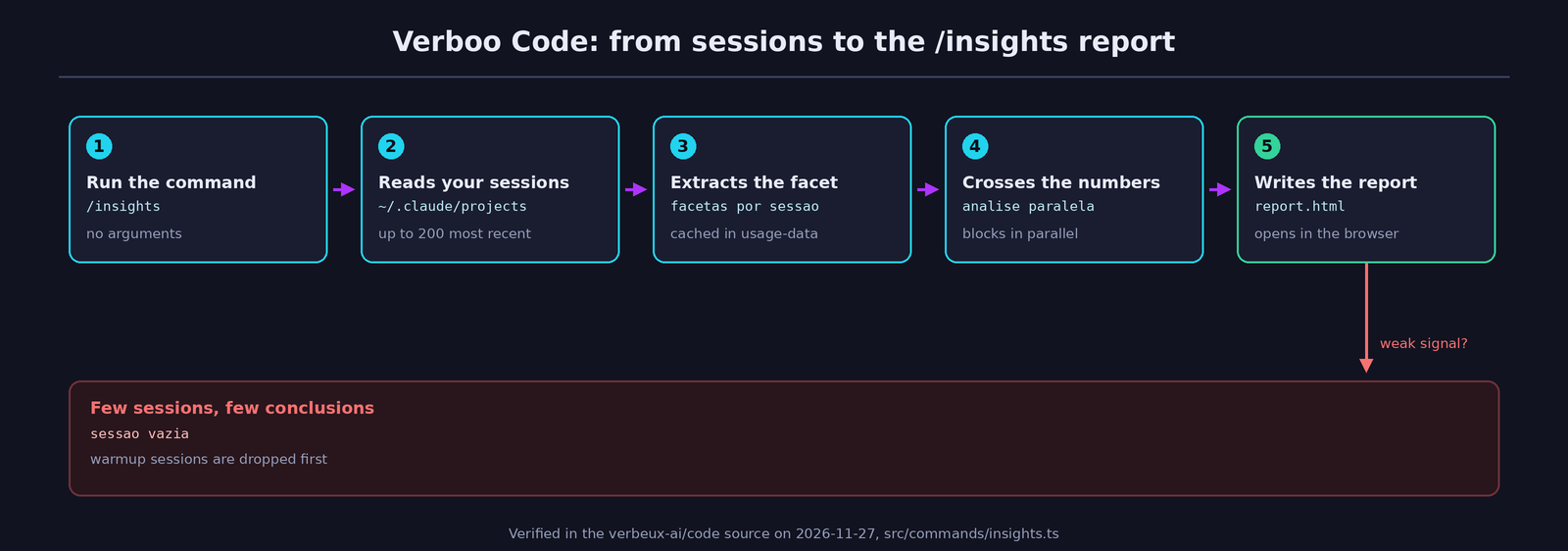
Which sections does the report contain?
The report opens with a four-line summary and then walks down the sections. Each one answers a different question about your work.
| Section | Question it answers |
|---|---|
| At a Glance | Opening summary: what worked, what hindered you, the quick win and the ambitious workflow. |
| What You Work On | Which project areas your sessions went into. |
| How You Use Verboo Code | Your interaction style: spec up front or iterate mid-flight. |
| Impressive Things You Did | The workflows that worked and are worth repeating. |
| Where Things Go Wrong | Friction, split between agent error and missing context on your side. |
| Existing CC Features to Try | Features already in the CLI that you are not using. |
| New Ways to Use Verboo Code | Feature combinations for the kind of task you do. |
| On the Horizon | Ambitious workflows that today depend on a stronger model. |
Where Things Go Wrong is usually the only section worth reading end to end. It separates what failed because of the agent from what failed because your instruction lacked context. That distinction is what turns the report into something actionable.
Where does the data come from and how much does the command read?
From the sessions in ~/.claude/projects, the shared projects directory the CLI uses. If you pointed another path in the VERBOO_PROJECTS_DIR variable, that is where it reads from.
- The command loads at most 200 sessions, newest first. Anything older than that is left out.
- Every analyzed session produces a facet file in
~/.verboo/usage-data/facets/. On the second run, only new sessions go through the model again. - If a facet file is corrupted, it is deleted and the session is reprocessed.
- Warmup sessions, the ones that only had one trivial prompt, are filtered out before the math. They show up in the scanned total, but not in the statistics.
The facet cache is the most practical detail: running /insights again a week later only costs the new sessions, not the whole history.
Why does the report sometimes come out shallow or empty?
Because the command only has what exists on disk, and the minimal-session filter cuts more than it looks.
If you run it on a new machine, or right after clearing the projects directory, there is no history to analyze. If you have used the CLI for two days, the report will have a few dozen messages and no conclusion. The report does not invent a pattern where there is no sample: it says what the data shows, and with few sessions the data shows almost nothing.
The path forward is to accumulate real sessions and run it again. A week of normal use is already enough material for the friction section to become useful.
How do I use the report without it becoming a vanity report?
Read Where Things Go Wrong, pick the friction that showed up most and change one habit. Running it again the following week and comparing is what closes the loop.
An example of the kind of adjustment that shows up: if the dominant friction is "the instruction lacked context", the gain does not come from switching models. It comes from writing the request with the file and the expected result before sending it. If the dominant friction is "the agent went down a path I did not want", the gain comes from planning first, with /plan.
The report measures you, not the tool. That is why it is useful: no benchmark number will tell you that your problem is an instruction that is too short.
/insights shows what you already did. The next session is where the number changes: in Verboo Code you run the report, adjust one habit and measure again the following week.